


Table of Contents
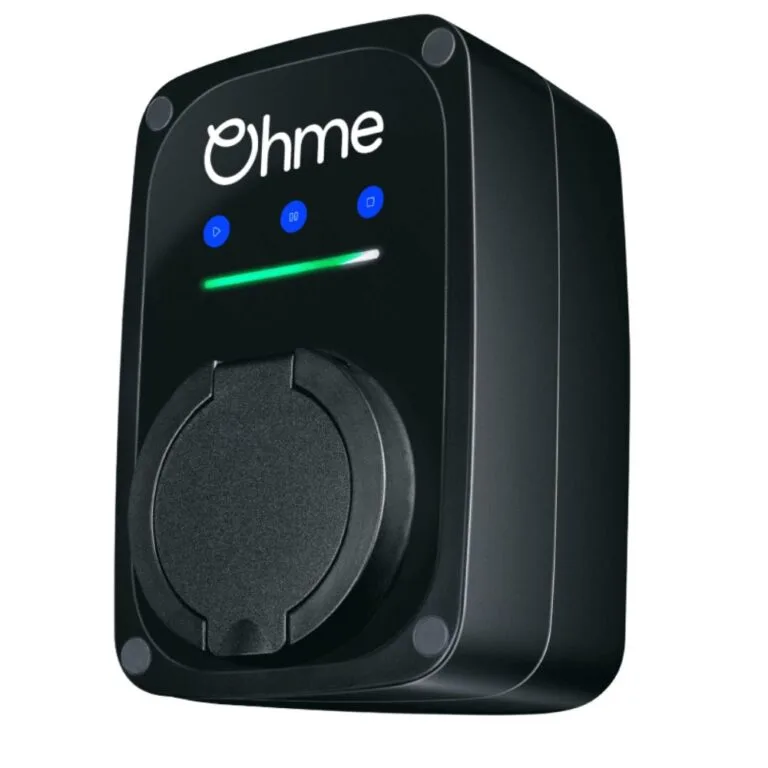
The Ohme ePod is a compact, socketed 7.4kW smart EV charger designed for home charging. Unlike the Ohme Home Pro, it does not have a permanently attached vehicle charging cable or LCD screen. Instead, it uses an LED indicator bar, three touch-sensitive buttons and the Ohme app.
This guide explains how the Ohme ePod works, what its different coloured lights mean, how to operate the charger and what electricians should know about its installation.
If you are considering purchasing one, Electrical4Less supplies the Ohme ePod 7.4kW socketed EV charger separately from installation.
What Is the Ohme ePod EV Charger?
The Ohme ePod is a single-phase smart EV charge point with a Type 2 socket. It can deliver up to 7.4kW (32A) on a suitable electrical supply, subject to the vehicle’s onboard charger and installation conditions.
Because the ePod is socketed, the vehicle charging lead can be disconnected and stored separately when not in use. This gives the charger a clean and discreet appearance on the wall.
The ePod uses Ohme’s smart charging platform to schedule charging around the driver’s preferences and supported electricity tariffs.
Ohme ePod Key Features
- Up to 7.4kW single-phase charging at 32A
- Socketed Type 2 connection
- Compact wall-mounted design
- Integrated 4G multi-network connectivity
- Three touch-sensitive control buttons
- LED indicator bar showing charging status
- Ohme app control and charging schedules
- Compatibility with supported smart electricity tariffs
- Dynamic load balancing using a CT clamp
- Integrated PEN-fault detection
- IP54 enclosure protection
- Three-year manufacturer warranty
The ePod does not have the LCD screen found on the Ohme Home Pro. Its buttons, indicator lights and mobile app provide the main controls and status information.
Ohme ePod Lights Explained – What Do the Colours Mean?
One of the most common questions about the Ohme ePod is how to interpret its LED lights.
The ePod has a horizontal LED indicator bar. Different colours, flashing patterns and moving sequences indicate whether the charger is ready, charging, waiting for a schedule, connecting to the internet or reporting a problem.
Important: The colour and light pattern must be considered together. For example, a solid blue light and a moving blue light indicate different charging states.
Green Lights – Ready, Connected or Charging Complete
- Solid green: The charger is idle and ready for a vehicle to be plugged in.
- Solid green on the rightmost LED: A vehicle is connected.
- Moving green lights from left to right: The charger is preparing a smart charging schedule.
- Blinking green: The charging session has completed.
Blue Lights – Smart Charging
- Solid blue: A smart charging session has been scheduled.
- Moving blue lights from left to right: Smart charging is in progress.
- Blinking blue: Maximum charging is in progress.
A solid blue light does not necessarily indicate a fault or a charging problem. It may simply mean that the charger is waiting for the scheduled charging period.
Yellow Lights – Solar Charging
- Solid yellow: Smart charging has been scheduled with solar charging enabled.
- Moving yellow lights: Smart charging is in progress with solar charging enabled.
Solar charging functionality depends on the installed equipment, charger configuration and supported Ohme features.
White Lights – Paused Charging or Configuration
- Solid white: Maximum charging has been delayed. The number of illuminated LEDs indicates the selected delay.
- Blinking white: The charging session is paused.
- Moving white lights: Charger configuration is in progress through the installer portal.
Purple Lights – Approval or Locked Buttons
- Moving purple lights: A charging session requires approval through the Ohme app.
- Blinking purple when a button is pressed: The charger’s buttons are locked.
If the charger requires approval, open the Ohme app and check whether the security settings are preventing the charging session from starting.
Orange Lights – Connection Problems
- Solid orange: The charger is experiencing a communication problem with the vehicle.
- Blinking orange on the rightmost LED: The charger is connecting to the internet.
If the charger remains offline or repeatedly shows a connection warning, check its status in the Ohme app. Persistent connectivity problems should be referred to Ohme support.
Red Lights – Charger Errors or Faults
- Blinking red on the rightmost LED: An error has occurred and the charger may require a reboot, as directed by Ohme.
- Solid red on the rightmost LED: A charger fault has been detected. Contact Ohme support.
If a red fault indicator appears, consult the Ohme app and current manufacturer instructions. Do not open the charger or attempt electrical repairs unless you are a suitably qualified person carrying out authorised work.
For Ohme’s latest explanations of LED states, see the official Ohme ePod indicator light guide.
How to Use the Ohme ePod Charger
The Ohme ePod can be controlled using the Ohme app or the three touch-sensitive buttons on the front of the charger.
After the charger has been professionally installed and commissioned, the usual charging process is straightforward.
- Connect a compatible Type 2 charging cable to the ePod socket and vehicle.
- Check that the charger recognises the vehicle connection.
- Use the Ohme app to set the desired charging target and schedule.
- Allow the charger to follow the configured charging schedule.
- Check the indicator lights or Ohme app for the current charging status.
- Once charging is finished, disconnect and store the cable according to the vehicle and charger instructions.
If a smart charging schedule is active, the charger may not begin delivering electricity immediately after the vehicle is connected. It can wait until the programmed charging period.
What Do the Three ePod Buttons Do?
The ePod has Play, Pause and Stop controls for basic charging functions.
- Play: Start or resume a charging session.
- Pause: Pause the current charging session.
- Stop: Cancel the charging session.
Additional functions are available through specific button holds and combinations. For example, holding Play can activate maximum charging, subject to the current charger controls and settings.
For the current button instructions, open the Ohme app’s Help section and look for How your ePod works.
Why Is My Ohme ePod Not Charging?
If your ePod is connected to a vehicle but no electricity appears to be flowing, it does not necessarily mean the charger is faulty.
Possible explanations include:
- A smart charging schedule is waiting for a lower-cost electricity period.
- The vehicle has reached its charging limit or target.
- The charging session has been paused.
- Approval is required through the Ohme app.
- The charger is temporarily offline.
- Dynamic load balancing is limiting the available charging current.
- The charger is displaying a vehicle communication error or fault.
Start by checking the LED colour and pattern, then review the Ohme app for charging status, schedules or warning messages.
If the charger displays a fault, repeatedly disconnects or has a suspected electrical problem, contact Ohme support or the original installer rather than attempting to repair the equipment yourself.
Ohme ePod Smart Charging and Electricity Tariffs
The ePod uses Ohme’s smart charging technology to help drivers schedule charging around their electricity tariff and vehicle requirements.
Through the Ohme app, users can configure charging preferences, choose a required ready time and select their electricity tariff where supported.
Depending on the tariff and configuration, the charger can schedule charging during lower-cost periods instead of charging immediately whenever the vehicle is plugged in.
Compatibility with particular smart tariffs, electricity providers and vehicles may change. Check current details with Ohme and the relevant energy supplier before relying on a specific integration.
Ohme ePod Installation – What Electricians Should Know
The Ohme ePod must be installed by a suitably qualified electrician with the knowledge and experience required for EV charging installations.
Unlike the Ohme Home Pro, which has a factory-fitted external flying lead, the Ohme ePod has internal mains supply terminals.
The electrician routes the supply cable through the appropriate rear or underside cable entry and connects the live, neutral and earth conductors inside the charger in accordance with Ohme’s installation instructions.
The installer must assess:
- Incoming electrical supply capacity and existing demand
- Consumer unit suitability
- Earthing and protective arrangements
- Overcurrent and residual-current protection requirements
- Supply cable size and installation method
- Suitable cable entry and weatherproof sealing
- CT-clamp connection and dynamic load-balancing requirements
- Charger location and mobile connectivity
- Electrical inspection, testing and commissioning
The ePod includes a CT clamp for load balancing. Its wiring connects using the manufacturer’s designated connection arrangement, and an additional gland may be required where a separate data cable enters the charger.
The ePod’s installation design, supply protection, CT clamp and commissioning settings must comply with the current manufacturer instructions and applicable electrical regulations.
For more information about EV charging electrical requirements, see our Ohme Charger Installation Guide.
Electricians should also consult the official Ohme ePod installation instructions before commencing work.
Ohme ePod vs Home Pro – Which Is More Suitable?
The ePod may suit drivers who prefer a discreet charger without a permanently attached vehicle charging cable. The Home Pro is generally more convenient for drivers who want the charging lead permanently available.
The Home Pro also features an LCD display, whereas the ePod communicates its charging status through the LED indicator bar and Ohme app.
Both offer up to 7.4kW single-phase charging and core Ohme smart-charging functionality, subject to the vehicle, installation and compatible services.
Read our Ohme Home Pro vs ePod comparison for a more detailed explanation of the differences.
Who Is the Ohme ePod Best Suited For?
- Drivers who prefer a socketed rather than tethered charger
- Homeowners who want a compact wall-mounted unit
- Households that already have a compatible charging cable
- Customers using supported smart electricity tariffs
- Drivers who prefer app-based charging control
- Properties where a permanently visible charging cable is undesirable
The final choice should take into account charging convenience, cable storage, vehicle compatibility, installation location and the electrical supply.
Frequently Asked Questions About the Ohme ePod
Further Information and Ohme Support
For up-to-date information about the ePod’s controls, indicator lights, charging schedules and troubleshooting, refer to the Ohme ePod support guide.
For faults or persistent charging problems, customers should contact Ohme support or their original qualified installer.
Final Summary – Understanding the Ohme ePod
The Ohme ePod is a compact smart EV charger designed for drivers who prefer a socketed charging arrangement. Its LED indicator lights make it possible to check the charging state without a built-in screen, while the Ohme app provides access to scheduling and supported smart-charging functions.
Understanding the different light colours, button functions and charging schedules can help owners recognise normal operation and identify when further support is required.
For current availability and product specifications, see the Ohme ePod product page at Electrical4Less, or explore the complete Ohme charger range.



































Leave a Reply