

ALL LED ASC/PX/RMT 8 Scene RF Remote
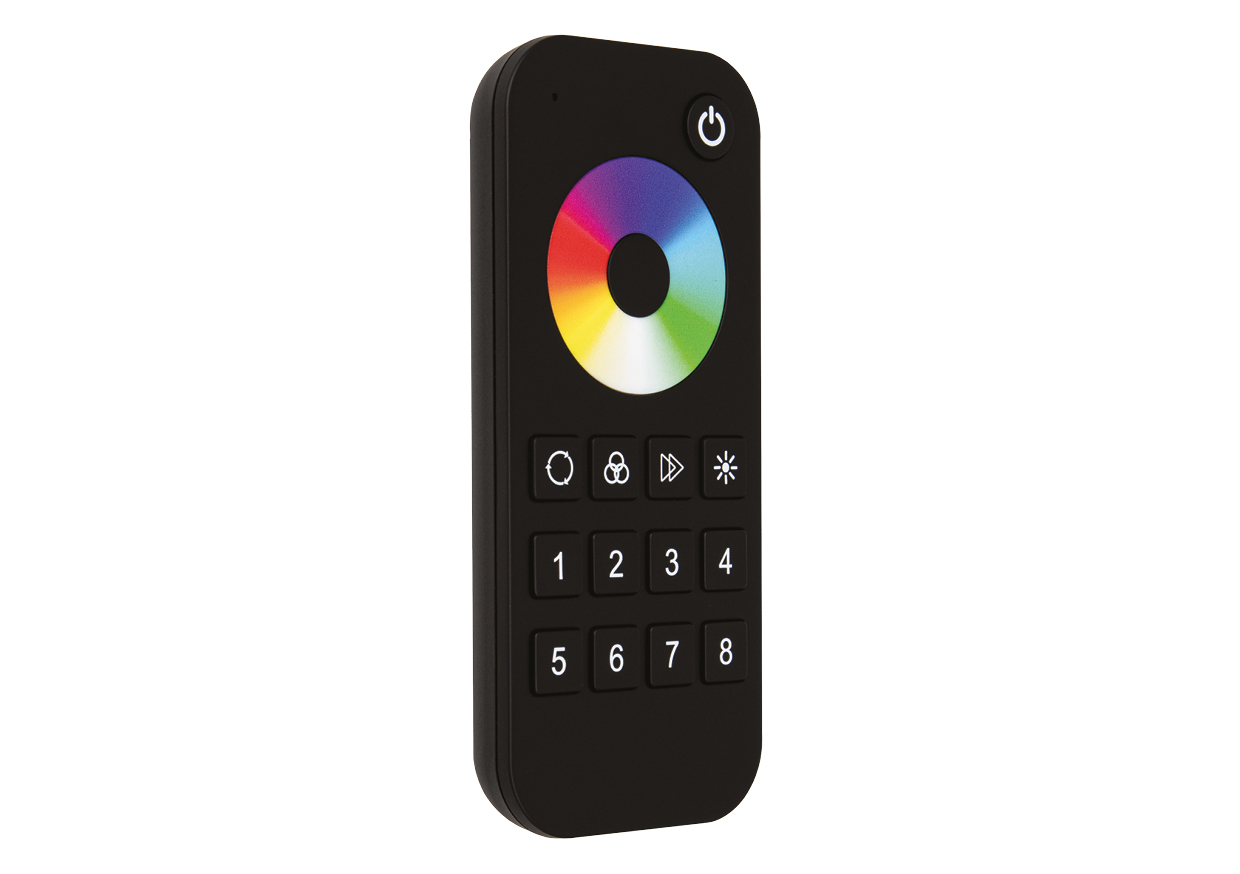
Bring your digital LED lighting to life without reaching for your phone. The ALL LED ASC/PX/RMT 8 Scene RF Remote is part of the ColourPixel+ range, designed to work with compatible SPI addressable LED strip receivers. Its touch-sensitive colour wheel, brightness and speed controls make it easy to change the atmosphere of a room, while eight scene buttons let you save the effects you use most often and call them back with a single press.
What does the ColourPixel+ remote do?
Unlike a standard RGB dimmer remote, the ASC/PX/RMT works with a compatible SPI pixel receiver to control addressable strip lighting. This means you can enjoy moving colour effects and patterned scenes rather than changing the whole strip to one static colour. Choose a colour on the touch wheel, browse the built-in effects or customise a dynamic scene to suit a display, feature wall or entertainment area. The available effects depend on the connected digital strip and receiver settings.
Eight scenes you can save and recall
The eight numbered scene keys are more than simple presets. After selecting an effect and its settings, you can save it to one of the eight scene memories. A short press later brings that scene back. This is useful for switching between everyday feature lighting, a favourite animated effect and a more colourful setting for entertaining without having to rebuild the look every time.
Key features
- Eight customisable scene memories: store and recall preferred lighting settings.
- Touch-sensitive colour wheel: adjust the static RGB colour intuitively.
- 40 built-in dynamic effects: browse moving colour patterns and adjust effect speed.
- Custom dynamic modes: create personalised effects using the available sequence and colour options.
- Brightness and speed adjustment: fine-tune how strong or how fast your lighting appears.
- Flexible scene-zone pairing: a scene button can be linked with compatible pixel receivers to control one or several lighting runs.
- Magnetic back and included mounting holder: keep the remote on a suitable metal surface or mount its holder with screws or adhesive tape.
- RF wireless operation: no direct cable is needed between the remote and receiver.
What else do you need for a complete installation?
This is a remote control, not an LED driver or receiver. For a working addressable LED strip system, choose the components below together:
- ASC/PX/REC ColourPixel+ receiver: receives commands from this RF remote and provides SPI control signals to the connected digital strip.
- Compatible 24V SPI pixel LED strip: for example, the ALL LED AST12PX/RGB IP20 strip for suitable dry indoor locations, or AST12PX/IP/RGB IP67 where the application requires a higher-rated strip. Check installation and connection requirements before selecting.
- Suitable constant-voltage LED driver: match the LED strip’s operating voltage and calculate the required wattage from its installed length. The 12W/m pixel strips need 120W for a 10m run before any design allowance; ensure the receiver, driver and strip ratings all remain within limits.
- Optional additional pixel receivers: useful when controlling several runs or areas through the same scene selection, subject to the receiver’s pairing limits.
The ASC/PX/RMT is for ColourPixel+ SPI digital strip control. Do not substitute the conventional StripLink+ AWC/STRIP/REC 5-in-1 receiver: that product is intended for standard single-colour/CCT/RGB/RGBW/RGBCCT strips, not addressable SPI pixel effects.
Pairing and everyday use
With the compatible receiver powered and correctly installed, briefly press the receiver’s Match button and then immediately press the remote’s power key. Several rapid flashes of the receiver indicator confirm that pairing has succeeded. Holding the receiver’s Match button for five seconds clears its stored remote pairings. Refer to the complete manufacturer manual for scene saving and the more advanced pixel-type, pixel-count and colour-order settings.
Technical specifications – ALL LED ASC/PX/RMT 8 Scene RF Remote
| Brand | ALL LED |
|---|---|
| Range | ColourPixel+ |
| Product code | ASC/PX/RMT |
| Product type | 8 Scene RF remote for SPI digital addressable LED strips |
| Battery | 2 × AAA |
| RF transmission range | 30m unobstructed |
| Dimensions | 122 × 53 × 17.5mm |
| Material | ABS |
| Ingress protection | IP20 |
| Standby time | 1 year (manufacturer specification) |
| Ambient operating temperature | -30°C to +55°C |
| Manufacturer guarantee | 2 years |
Practical buying advice
If you are assembling a new ColourPixel+ installation, order the remote alongside an ASC/PX/REC receiver, the appropriate SPI LED strip and a correctly sized power supply. This gives you the complete control chain rather than a handset that cannot operate the lighting on its own. The downloadable datasheet and instructions provide the detailed scene programming and matching procedure for the installer.
Complete Your Lighting Installation
This ColourPixel+ control product is intended for a compatible SPI pixel-lighting system. You will also need the correct receiver or control accessory, suitable pixel strip and power supply as applicable. Browse ALL LED strip lights and ALL LED drivers when planning the full installation.
Our LED strip controller range contains other control options, but standard RGB controllers should not be assumed compatible with SPI pixel lighting.
Compatible ColourPixel+ Components
This is part of the addressable SPI pixel system, not the conventional 5-in-1 StripLink+ system. Check the required receiver, strip and control options below.
- required ColourPixel+ SPI receiver (ASC/PX/REC)
- IP20 RGB pixel strip (AST12PX/RGB)
- IP67 RGB pixel strip (AST12PX/IP/RGB)